

If you want to get more done in your DTF printing business without sacrificing quality, optimizing your workflow is key. By using tools like gangsheet builders, standardizing settings, and automating repetitive tasks, you can cut down setup time and reduce material waste.
Boosting your productivity in DTF printing comes from combining smart planning, consistent templates, and efficient batch processing to save time and maintain reliable results. These strategies help you move from design to finished product faster while ensuring your prints stay sharp and vibrant.
You’ll also learn how reusing artwork blocks, managing color profiles, and running quality checks can prevent costly mistakes and keep your output steady. These practical hacks allow you to produce more with less stress and keep your production smooth.
Optimize Your Design Workflow
To boost your productivity in DTF printing, start by organizing your design process clearly. Set specific goals for each project to know exactly what you need to achieve. This helps you avoid wasted time on unnecessary tasks.
Using tools like a DTF gangsheet builder can save a lot of time. It lets you arrange multiple designs efficiently on one sheet. This reduces material waste and speeds up printing by maximizing space.
Managing your color profiles is crucial. Make sure you use the correct color profiles for your printer and inks. This ensures accurate colors and less rework caused by color mismatches.
Create and save reusable templates for your common design elements. Templates help maintain consistency in your prints and speed up the time needed for repetitive tasks.
Keep your digital workspace organized by labeling layers and grouping similar files. It makes finding and editing your designs faster, which is important when working on multiple projects.
Try using project management tools or time-tracking apps to monitor your workflow. These tools help you stay on schedule and manage deadlines without feeling overwhelmed.
Lastly, limit distractions by setting dedicated work times. Focusing fully during these periods improves your design quality and speeds up completion.
Keep Your Printer Maintained
Maintaining your DTF printer is key to saving time and avoiding costly repairs. Start with daily checks like inspecting components, verifying ink or toner levels, and testing print alignment. These small steps catch issues early and help keep your printer running smoothly.
Perform weekly deep cleaning to remove dust and debris. Focus on rollers, print heads, and paper paths. This prevents jams and print quality problems before they stop your workflow.
Use quality supplies such as manufacturer-approved inks and paper. Poor materials can damage your printer and reduce print reliability.
Keep your printer’s environment stable. Control temperature and humidity to avoid ink drying issues or paper curling. A clean, dust-free space also protects your equipment.
Use this simple maintenance checklist to help you stay on track:
| Frequency | Task | Purpose |
|---|---|---|
| Daily | Visual inspection | Catch small problems early |
| Weekly | Deep cleaning | Prevent clogs and jams |
| Monthly | Thorough internal checks | Detect wear and tear |
| As needed | Replace consumables | Maintain print quality |
Following these guidelines will help you maintain consistent print quality and extend your printer’s life. Regular care reduces downtime, so you spend less time fixing problems and more on your projects.
Master Your Heat Press Settings
To save time and get the best print quality in DTF printing, mastering your heat press settings is essential. You need to balance pressure, temperature, and time carefully for every job.
Start by setting the pressure to medium-firm. This ensures the transfer film sticks evenly to your fabric. Too little pressure causes peeling, while too much can damage the print or fabric. Adjust pressure based on fabric thickness.
Next, adjust the temperature based on the fabric type:
| Fabric Type | Temperature (°F) | Time (seconds) | Notes |
|---|---|---|---|
| 100% Cotton | 325 – 350 | 10 – 15 | Handles higher heat well |
| Polyester Blends | 280 – 300 | 12 – 15 | Use lower heat to avoid scorch |
| Sensitive Fabrics | Follow manufacturer instructions | Varies | Use heat shields like Teflon sheets |
Set your time between 10 to 15 seconds. Too short means poor adhesion. If pressed too long, the print may crack or degrade. Use a timer for consistency, especially during batch runs.
Always pre-press your garments for 3-5 seconds to remove moisture and wrinkles. This step helps improve adhesion and reduces heat marks.
Finally, test your settings on scrap material before a full run. Adjust as needed to keep your print quality high while speeding up your workflow.
Organize Your Workspace
A tidy workspace is essential for efficient DTF printing. Start by removing unnecessary items from your desk. Keep only essential tools like your printer, heat press, inks, and transfer papers within easy reach.
Use storage solutions such as drawer organizers or small bins to separate ink cartridges, cleaning supplies, and spare parts. This reduces time spent searching for what you need.
Cable management is also important. Use clips or ties to keep cords neat and out of the way. This prevents accidental disconnections or damage during printing.
Make sure your workspace has good lighting to help you see details clearly. Natural light is best, but a bright desk lamp works well if needed.
Keep a cleaning routine at the end of each day. Wipe surfaces and organize supplies to ensure your next session starts smoothly.
Consider arranging your area into zones. For example:
| Zone | Purpose | Key Items |
|---|---|---|
| Printing area | Printer and transfers | DTF printer, transfer sheets |
| Preparation area | Ink mixing and cleaning | Ink bottles, cleaning tools |
| Heat press zone | Curing printed transfers | Heat press, gloves |
This setup helps you move efficiently between tasks without unnecessary steps.
By organizing your workspace thoughtfully, you will reduce distractions and save valuable time during DTF printing.
Use The Right Printer For Your Volume
Choosing a printer that matches your printing volume is key to saving time and avoiding delays. Different models offer various speeds, sizes, and features designed for specific workloads. Picking the right one helps maintain smooth production and consistent print quality.
Huedrift One DTF Printer
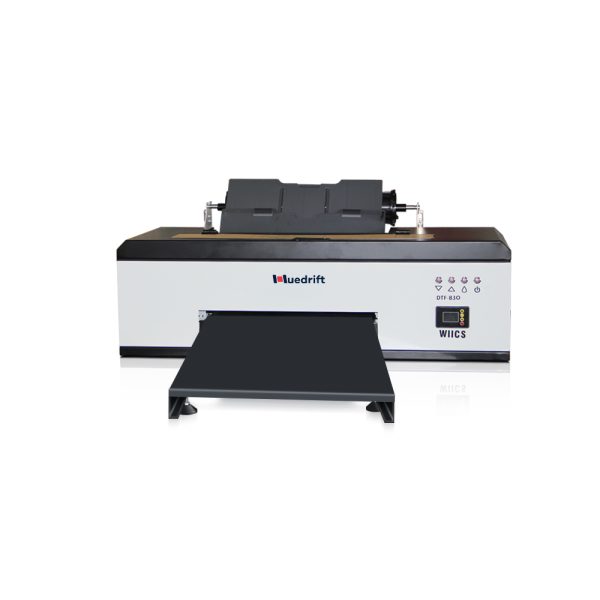
Huedrift One A3+ R1390 DTF Printer
Tired of Complex Print Setups and High Maintenance Costs?
Huedrift One A3+ R1390 DTF Printer is an adaptable and affordable medium format print-on-demand option that can achieve over 100 prints per day.
- Both roll and sheet feeding options for a range of production needs.
- With a maximum resolution up to 2880 DPI on a variety of fabrics.
- Has a 6-channel printhead which includes (CMYK + White + White) with a 3-in-1 white ink circulation to avoid clogging and for dependable printing.
The Huedrift One is a beginner-friendly, cost-effective option. It suits you if you are just starting with DTF printing or have low to medium production needs.
This printer handles standard print sizes well and uses water-based DTF inks for vibrant color. It offers consistent results on fabrics like cotton and polyester without complex setup. You’ll benefit from its straightforward operation and detailed tutorials, allowing you to focus on design and workflow.

Huedrift Pro DTF Printer

Huedrift Pro A3+ R1390 DTF Printer
Say goodbye to clogged nozzles, inconsistent colors, and slow production. The HueDrift Pro DTF Printer is built for creators and businesses who demand speed, precision, and reliability. With advanced printheads, vibrant color output, and a streamlined workflow, it delivers professional-quality transfers on a wide range of fabrics. Engineered for efficiency and durability, it’s the perfect solution to scale your custom printing business with confidence.
Huedrift Pro targets semi-professionals who demand faster printing and greater print quality. It offers a larger printing area and advanced ink management for sharp, colorful images.
This model supports more media types and volumes, making it good for small to mid-sized businesses. It includes improvements in precision and reliability, reducing downtime. The Pro’s remote support ensures you get help quickly, so your work stays productive.

Huedrift Pro Max DTF Printer
Huedrift Pro Max DTF Printer 13″ A3 L1800
Tired of clogged nozzles, faded colors, and wasted time on unreliable printers? The HueDrift Pro Max DTF Printer 13" A3 L1800 is built to solve those frustrations. Perfect for creators, studios, and small businesses, it delivers the vibrant, long‑lasting prints your customers expect—without the headaches. With upgraded precision engineering and easy‑to‑use controls, this DTF printer ensures smooth operation, consistent transfers, and professional results on a wide variety of fabrics. Finally, you can focus on growing your business instead of fixing your printer.
The Huedrift Pro Max is designed for high-volume and professional environments. It features wide-format printing, faster print speeds, and robust hardware to handle continuous production.
Your prints will show excellent detail and durable adhesion, suited to diverse fabrics and products. This printer supports complex jobs and large batches, helping you scale your DTF business efficiently. It also offers advanced maintenance features and thorough remote technical support to keep it running smoothly.

Batch Your Printing Jobs
Batching your printing jobs means grouping multiple designs or orders to print at the same time. This approach saves you setup time and reduces material waste by fitting more prints on a single transfer sheet.
Using gang sheet printing is a smart way to batch jobs. It allows you to arrange several designs on one large transfer sheet. This reduces the number of print runs and speeds up your entire workflow.
When you batch, you benefit from:
- Faster setup: fewer changes between jobs
- Less waste: optimal use of transfer materials
- Consistent print quality: uniform color and alignment across batches
You can use gang sheet design software to automate layout planning. It controls spacing, bleed areas, and color separation. This reduces errors and cuts down on reprints.
Make sure your gang sheet templates are standardized. This lets your team run batch jobs quickly and repeatably without extra adjustments.
Batch printing also simplifies color management. You keep colors consistent across all designs in a batch, which helps in maintaining quality for every order.
Focus on tracking metrics like setup time, sheets printed per hour, and material waste. This data will help you measure improvements after batching your jobs.
By batching effectively with gang sheets, you can improve your productivity with less effort and higher reliability.
Invest In Quality Supplies
Investing in quality supplies is essential to boost your productivity in DTF printing. When you use reliable materials, you reduce errors and save time on reprints.
Start with high-quality DTF film. Good film ensures better ink adhesion and vibrant colors. This helps your transfers last longer and look sharper.
Choose inks made specifically for DTF printing. These inks provide consistent colors and better durability across different fabrics. Using low-quality inks can cause fading and poor print performance.
Color management tools are vital. By calibrating your printer with color calibration devices, you ensure that your printed colors match your design files closely. This reduces wasted prints caused by color mismatches.
A well-maintained heat press is also a key supply. Having a heat press that can reliably control temperature and pressure ensures consistent results and saves you from costly mistakes.
Here’s a quick checklist for quality supplies:
- High-resolution DTF printer and inks
- Premium DTF films
- Color calibration tools
- A reliable heat press with adjustable settings
By focusing on these tools, you maintain a smooth workflow. Your prints will have higher quality, and you spend less time fixing problems caused by poor supplies.
Conclusion
Efficiency in DTF printing starts with understanding your equipment and materials. Regular maintenance and using high-quality films and inks directly impact your print quality and workflow speed.
Adjusting your heat press’s temperature and pressure is essential. Finding the right settings for each material helps you avoid errors and wasted resources while ensuring prints last longer.
Organize your workspace for easy access to tools and materials. This reduces downtime between jobs and helps you meet deadlines faster.
Implement digital tools to automate design preparation and color calibration. These tools save time and reduce mistakes.
Train your team consistently. Well-informed staff handle troubleshooting and produce reliable results, improving your overall productivity.
Keep a simple checklist for each job:
| Task | Frequency |
|---|---|
| Equipment cleaning | Daily |
| Test prints | Before big runs |
| Calibration reviews | Weekly |
| Staff training updates | Monthly |
By following these steps, you ensure a smooth, efficient DTF printing process without sacrificing quality. Your workflow becomes more predictable, and your customers receive consistent, vibrant prints every time.
Frequently Asked Questions
Efficient time management, automation, and proper preparation are key to improving your DTF printing workflow. Identifying and reducing bottlenecks helps maintain steady production, while regular maintenance keeps your equipment running smoothly.
What are the best time management techniques when operating DTF printers?
Prioritize batch printing to reduce time switching between print jobs. Use time blocking to allocate specific periods solely for printing tasks.
Organize your files and materials before starting to avoid delays. Minimize distractions during print runs to maintain focus and speed.
How can automation improve efficiency in the DTF printing process?
Automation can handle repetitive tasks like job queuing, setting print parameters, and monitoring print status. This reduces manual input and errors.
Using software that integrates with your printer speeds up workflow by automatically processing print jobs and managing queues.
What are the common bottlenecks in DTF production and how can they be mitigated?
Frequent printer jams, file format issues, and slow drying times often slow down production.
Mitigate these by regular printer maintenance, converting files to compatible formats in advance, and optimizing curing processes.
Can you suggest any software tools designed to streamline workflow in DTF printing?
Look for tools that support batch printing and file conversion to manage diverse file types.
Some software offers automation features that reduce manual steps and control print settings centrally.
What pre-printing preparation steps can save time for DTF operations?
Organize all design files into one folder. Check file formats and convert incompatible ones ahead of time.
Plan your print queue by grouping similar jobs. Prepare materials such as films and powders before starting.
What maintenance routines are essential for minimizing downtime in DTF printing?
Clean printheads regularly to prevent clogs. Check rollers and feeding mechanisms for wear.
Perform routine calibration to maintain print quality. Schedule downtime for full inspections to catch issues early.