
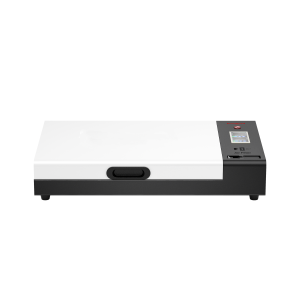
DTF Printing Equipment

DTF Printing Equipment: Complete Setup Guide | Huedrift

Also in this guide

You have the equipment — now learn how everything fits together: the full workflow, cost breakdown by setup size, and answers to the most common DTF questions.

Complete Equipment Guide

DTF Printing Equipment:
Everything You Need to Start

From printer to heat press — understand every piece of the DTF setup before you spend a dollar. Built for small businesses and first-time buyers.

5 core equipment types 3 setup tiers by budget Honest cost breakdown No fluff, no upsells
5
Types of equipment in a complete DTF setup
$2.3k
Minimum to start a functioning DTF operation
$5.80
Supply cost per A3 shirt print (ink + film)
2 mo
Typical break-even for a small studio at 250 orders/month

Overview

What Equipment Does DTF Printing Actually Require?

Unlike screen printing, DTF doesn't need screens, films, or emulsion. But it does require a specific chain of equipment — skip one link and the transfer won't stick. Here's the complete picture before you buy anything.

1
DTF Printer
Prints design onto PET film
2
Apply Powder
Coat wet ink with hot-melt powder by hand
3
Curing Oven
Melts & bonds powder into ink at ~160°C
4
Heat Press
Transfers cured film to fabric
5
Finished Print
Peel film, press again, done
How Huedrift printers handle powdering: Huedrift A3+ printers output printed PET film that you powder manually — sprinkle hot-melt adhesive powder over the wet ink, shake off the excess, then cure in the Huedrift oven. This keeps the setup simple and compact, ideal for small studios and side hustles.

Equipment Breakdown

The 5 Core Pieces of DTF Equipment Explained

What each piece does, what to look for, and what you can skip at first.

🖨️
Step 1 — Required

DTF Printer

The printer lays down CMYK + white ink onto a PET film. White ink is printed first as an underbase so colors show up vibrantly on dark fabric. The printhead brand — R1390 or L1800 — determines output quality, service life, and white ink stability.

What to look for: Epson printhead (not clone), A3+ minimum width, white ink circulation system to prevent clogging. Avoid machines with no-name heads — consumable costs spiral quickly.
View Huedrift DTF Printers
🫙
Step 2 — Manual Process

Hot-Melt Powder Application

After the DTF printer outputs the film, the wet ink needs to be coated with hot-melt adhesive powder while it's still tacky. With Huedrift printers, this is done manually — sprinkle powder evenly over the printed film, then gently shake off the excess before moving to the curing step.

What you need: A container of DTF hot-melt adhesive powder (available in our supplies store) and a flat tray or sheet to catch excess powder. No special machine required — this step takes under a minute per film sheet.
🔥
Step 3 — Required

Curing Oven for DTF Printer

After powdering, the film goes into the curing oven which melts the hot-melt adhesive at a controlled temperature (typically 320–340°F / 160–170°C), bonding it permanently to the ink. Temperature accuracy is critical — under-cured powder peels off fabric; over-cured powder turns brittle and cracks.

Huedrift Oven for DTF Printer — $599.99: Designed specifically for A3+ DTF film output. Even heat distribution, precise temperature control, and compact footprint suitable for a home studio or small shop.
Can I use a household oven? A regular kitchen oven can cure DTF powder in a pinch, but temperature is rarely even enough across the film — expect inconsistent adhesion and possible peeling after washing. It also exposes your kitchen to adhesive powder fumes. A dedicated DTF oven is strongly recommended for any regular production.
Shop Oven for DTF Printer
👕
Step 4 — Required

Heat Press Machine

The heat press transfers the cured DTF film onto your garment by applying even heat and pressure for 10–15 seconds. Even pressure distribution across the platen is critical — any uneven spots cause partial transfers and wasted prints. After pressing, peel the film and do a short second press for maximum durability.

Huedrift Heat Press Machine — $399.99: Swing-arm design with digital temperature and timer controls. Suitable for A3+ transfers on t-shirts, hoodies, tote bags, and any flat fabric surface. Ships free within the US.
Can I use a household iron? An iron can transfer DTF film, but it applies uneven pressure and lacks precise temperature control — this typically results in partial transfers, edges lifting, and designs that peel after a few washes. Fine for testing your first print; not suitable for customer orders or any consistent production.
Shop Heat Press Machine
💻
Step 0 — Required Before Printing

RIP Software

RIP (Raster Image Processing) software sits between your design file and the printer. It controls white ink layering, color profiles, print resolution, and nozzle calibration. Without it, the printer has no way to manage the white underbase that makes DTF work on dark fabric.

Common options: Maintop, Cadlink, ErgoSoft. Most Huedrift printers come with software compatibility guidance. A modern computer (Windows 10+, 8GB RAM minimum) runs all of these without issue.
🧪
Ongoing — Required

DTF Supplies

DTF supplies are your ongoing operating cost. The big three are DTF ink (CMYK + White), PET film (the transfer substrate), and hot-melt adhesive powder. Combined, these cost approximately $5.80 per A3 shirt print — the baseline for all ROI calculations.

Don't compromise here: Low-quality ink leads to clogged heads. Cheap powder gives inconsistent adhesion. Use DTF supplies rated for your printhead — it protects your hardware warranty and print quality.
Browse DTF Supplies

Setup Guide

Complete DTF Setup by Business Size

Three configurations based on where you are in your business — and what you actually need to run profitably at each stage.

Side Hustle Starter Small Studio Growing Business
DTF Printer Huedrift One (R1390)
$1,999
Huedrift Pro (L1800)
$2,199
Huedrift Pro Max (L1800)
$2,599
Powder Process Manual (hand application) Manual (hand application) Manual (hand application)
Powder Cost ~$30–$50 (consumable) ~$50–$80 (consumable) ~$100+ (consumable)
Heat Press Iron or Huedrift Heat Press ($399.99) Huedrift Heat Press Huedrift Heat Press ×2
Heat Press Cost Own / $399.99 $399.99 $799.98
Curing Oven Own oven or Huedrift Oven ($599.99) Huedrift Oven for DTF Huedrift Oven for DTF
Oven Cost Own / $599.99 $599.99 $599.99
Monthly Capacity 50–150 shirts 250–500 shirts 600+ shirts
Est. Total Setup Cost ~$2,150–$3,300 ~$3,300–$3,500 ~$4,500–$5,000
Best For Etsy, Instagram, testing the market Local clients, repeat orders, Shopify Wholesale, print shops, high-volume
The Huedrift advantage: All three Huedrift printers use Epson printheads and ship free within the US — the largest single cost in your setup comes with no markup over factory price. Calculate your exact break-even timeline →

Budget Planning

How Much Does a Full DTF Setup Cost?

Itemized estimates for each tier so you can plan before you buy — not after.

Side Hustle Starter
Minimum Viable Setup
From ~$2,150
Huedrift One Printer$1,999
Curing ovenOwn / $599.99
Heat press / ironOwn / $399.99
RIP softwareIncluded
Starter ink + film + powder~$150
Note: A household oven or iron can substitute at first, but results will be less consistent. For reliable transfers and wash durability, a dedicated DTF curing oven and heat press are strongly recommended.
Small Studio — Most Common
Professional Setup
~$3,400
Huedrift Pro Printer$2,199
Oven for DTF Printer$599.99
Heat Press Machine$399.99
RIP softwareIncluded
Starter ink + film + powder~$200
Growing Business
High-Volume Setup
~$4,350
Huedrift Pro Max$2,599
Oven for DTF Printer$599.99
Heat Press Machine ×2$799.98
RIP softwareIncluded
Bulk ink + film + powder~$350

Common Questions

DTF Equipment FAQ

What equipment do I need to start DTF printing?
To start DTF printing you need five things: a DTF printer, a powder shaker or curing oven, a heat press, RIP software, and DTF supplies (ink, PET film, hot-melt powder). The printer and powder process are the core investment — the heat press and software can be entry-level at first and upgraded as volume grows.
Do I need a powder shaker machine for DTF printing?
Applying hot-melt adhesive powder is a mandatory step, but you don't need an automatic shaker machine to do it. Huedrift printers output DTF film that you powder manually — sprinkle hot-melt powder over the wet ink, shake off the excess by hand, then cure in the oven. This manual process is straightforward, costs nothing extra beyond the powder itself, and is well-suited for studios producing up to several hundred shirts per month.
Can I use a household iron instead of a heat press?
A household iron can transfer a DTF film in a pinch, but it has two significant limitations: uneven pressure and no precise temperature control. Most irons don't distribute heat evenly and can't hold a stable 320–340°F across the full print area. The result is usually partial transfers, lifting edges, and prints that peel after washing.

An iron is acceptable for your very first test print to verify the DTF process works — but for any customer order or regular production, the Huedrift Heat Press Machine ($399.99) ensures consistent pressure, accurate temperature, and professional wash durability.
How much does a complete DTF printing setup cost?
It depends on your volume target:
  • Side hustle (50–150 shirts/month): ~$2,300–$2,800 total
  • Small studio (250–500 shirts/month): ~$3,700–$4,500 total
  • Growing business (600+ shirts/month): ~$5,500–$6,500 total
The Huedrift One at $1,999 with free US shipping is the most affordable entry point with a genuine Epson printhead.
What software do I need for DTF printing?
You need RIP (Raster Image Processing) software to control color profiles, white ink layers, and print resolution. Without RIP, the printer cannot manage the white ink underbase that makes DTF work on dark fabric. Common options include Maintop, Cadlink, and ErgoSoft. Huedrift printers come with software compatibility guidance so you know exactly what to install on day one.
What does the curing oven do in DTF printing?
After you apply hot-melt powder to the printed film by hand, the curing oven melts the powder at a controlled temperature (320–340°F / 160–170°C), permanently bonding it to the ink layer. This creates a stable, pressable film ready for the heat press. Without proper curing, the powder won't bond correctly and the transfer will peel off the fabric after washing. The Huedrift Oven for DTF Printer ($599.99) is designed specifically for A3+ film output with precise temperature control.
How long does it take to print and transfer one DTF shirt?
With a full setup, total time per shirt is roughly:
  • Printing: 3–6 minutes per A3 film (depending on quality setting)
  • Powdering + curing: 3–5 minutes (or continuous with auto shaker)
  • Heat press transfer: 15 seconds press + 5 seconds cold peel
In practice, a Huedrift printer running 8 shirts/hour means you can produce around 60–80 finished shirts per full working day once the workflow is optimized.

Next Step

Ready to Build Your DTF Setup?

Start with the printer — the single biggest decision in your equipment chain. Everything else can be added or upgraded as your volume grows.

Compare DTF Printers

See all three Huedrift models side by side — specs, printheads, output speed, and pricing. Free US shipping on every order.

View All DTF Printers →

Calculate Your ROI First

Enter your monthly order volume and sale price to see your exact break-even timeline and annual profit before you commit to any equipment.

Open ROI Calculator →
Shopping Cart